Top Software EUROPESOFTWARES EasyVoiceIP
|
|
| |
|
|
| [v2026.5.19] |
|
| |
|
|
 |
Software Overview
|
|
| « Discover our PC-to-PC audio communication software. » | | License Type: SHAREWARE (Try it free for 30 days) | | Technology: Java (Oracle), XML | | Operating System: WINDOWS, LINUX, MAC OS X, SOLARIS |
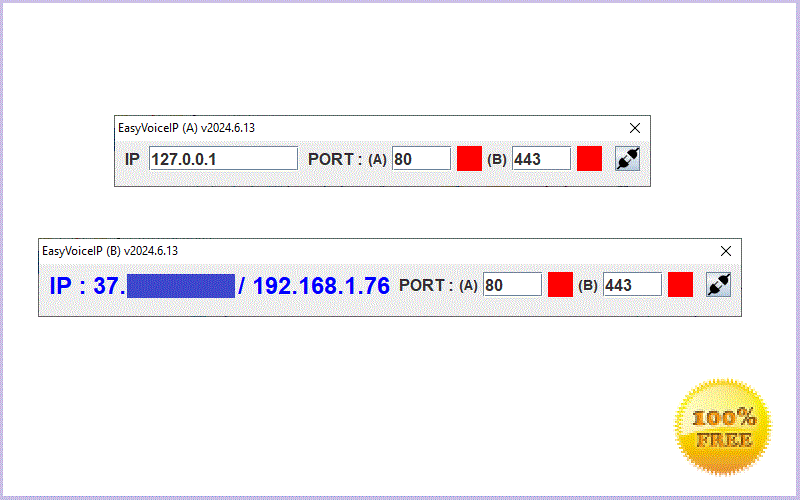
| | This audio communication software solution developed by EuropeSoftwares allows audio communication from PC to PC. | | The solution uses the IP address of the PC to facilitate smooth and efficient communication online. It uses two dedicated audio ports to ensure a high-quality sound experience, connecting the input port to the speakers and the output port to the microphone. This optimizes the use of PC resources, simplifying and improving the audio communication process. | | The software is available in 15 international languages, making it accessible to a wide range of users around the world. It offers an intuitive interface tailored to specific communication needs, and allows for the manual addition of other languages for greater flexibility. This multilingual feature makes it an essential tool for businesses looking to expand their overall reach and improve user engagement. | | The software offer includes new versions and evolutions at no additional cost, always guaranteeing the latest improvements to customers. Only support services that require expensive labor can be charged, with these costs adjusted according to specific demand. This transparent and flexible approach aims to deliver optimal value and enable efficient budget management without surprises. | | EuropeSoftwares offers unlimited free tools to optimize the productivity and efficiency of its users. These high-quality solutions are aimed at simplifying processes in various areas such as project management or software development. Take advantage of this opportunity to improve your technical skills and the quality of your projects without restrictions. | | | | EuropeSoftwares strives to improve the accessibility of its products by focusing on the simplicity and efficiency of their design. Their goal is to ensure that their software is quickly and intuitively used for all users, regardless of their technical level. By adopting a user-centric approach, they aim to democratize access to digital tools to make their products easily manageable by all. |
|
| |
Supplements
|
|
|
| |
Characteristics
 |
Ease of use |
|
The interfaces are designed to be intuitive and accessible even to beginners. |
|
|
XML Technology |
|
The XML data remains under the complete control of the user, without dependency on an external database. |
|
|
Multilingualism |
|
The software is multilingual (15 languages by default) and even allows you to manually add other languages. |
|
|
Cross-platform compatibility |
|
The software runs on Windows, Linux, macOS, and Oracle Solaris operating systems. |
|
|
30-day shareware version |
|
The software provides the opportunity to fully test the software before purchasing a user license. |
|
|
Quick and easy installation |
|
Everything is designed so that any user can put the software on their computer in a few minutes. |
Highlights
 An unbeatable quality/price ratio! An unbeatable quality/price ratio!
Unbeatable prices all year round!
The software is available for unlimited download!
Any license purchased is acquired for life!
Any ENTERPRISE license purchased is valid for 12 months!
Software updates and future versions are included!
|
|
|
|
| |
 |
Similar products
|
|
 |
Discover our communication software for online chat and remote desktop. |
 |
Discover our PC-to-PC audio communication software. |
 |
Check out our PC-to-PC communication software with webcam and online chat. |
 |
Discover our computer-to-computer remote support software. |
|
|
|
 |
Disclaimer: EuropeSoftwares is the only company authorized to sell its products and services. Multiple and large volume licenses are intended for the same company or a single person and not for resale individually! This software is governed by copyright, their authorization for resale (profits) must be the work of a specific partnership contract! Licences are issued in the name of the buyer who is responsible for the latter and failure to comply with the conditions of sale exposes the buyer to heavy criminal penalties. |
|
 |
Three levels of support adapted to each need
|
|
|
Unit priceT.T.C (€) |
Total priceT.T.C (€) |
Purchase
|
Purchase |
e-Support Level 1 (Free)
For any difficulty at the basic level, EuropeSoftwares offers a set of online tools that are accessible 24 hours a day (AI Assistants, Tutorials, Forum, Online Help, etc.).
|
|
0.00 € |
0.00 € |

|
e-Support Level 2 (Paid)
12 months
For any intermediate level difficulty, you can request EuropeSoftwares technical support by email only and receive assistance from a dedicated technical expert.
|
|
From
39.99 €
[EN]
+20%
|
From
39.99 €
[EN]
+20%
|
|
|
 ⚠Authorization
|
e-Support Level 3 (Paid)
For any major level difficulty, you have the option to book a 30-minute slot to benefit from personalized support from EuropeSoftwares, by phone or via a private online chat, with a dedicated technical expert.
30
Minutes of phone support or private online chat with a technical expert
(T1) - EASYVOICEIP
|
 Booking calendar Booking calendar |
|
49.99 €
|
49.99 € |
|
|
⚠Authorization
|
|
|
The user can purchase Level 2 e-Support either at the same time as the purchase of a software license or independently thereafter. |
|
 |
Special launch shortcut
(Windows/MacOS/Linux/Solaris - 32/64bits) |
|
| |
| ≡For a given user |
| |
 |
Setup NSIS
"C:\Users\christian\Documents\EuropeSoftwares\EasyVoiceIP\easyvoiceip.jar"
START_IN_DIRECTORY= "C:\Users\christian\Documents\EuropeSoftwares\EasyVoiceIP" |
|
|
Setup IZPACK
java -jar "INSTALL_PATH/src/easyvoiceip.jar" "INSTALL_PATH/src/"
INSTALL_PATH= C:\Users\christian\Documents\EuropeSoftwares\EasyVoiceIP
|
|
 |
Setup IZPACK
java -jar "INSTALL_PATH/src/easyvoiceip.jar" "INSTALL_PATH/src/"
INSTALL_PATH= /home/christian/EuropeSoftwares/EasyVoiceIP |
|
 |
Setup IZPACK
java -jar "INSTALL_PATH/src/easyvoiceip.jar" "INSTALL_PATH/src/"
INSTALL_PATH= /Users/christian/Applications/EuropeSoftwares/EasyVoiceIP |
|
 |
Setup IZPACK
java -jar "INSTALL_PATH/src/easyvoiceip.jar" "INSTALL_PATH/src/"
INSTALL_PATH= /home/christian/Applications/EuropeSoftwares/EasyVoiceIP |
|
| |
| ≡For all users |
| |
|
|
Setup NSIS
"C:\EuropeSoftwares\EasyVoiceIP\easyvoiceip.jar"
START_IN_DIRECTORY= "C:\EuropeSoftwares\EasyVoiceIP" |
|
|
Setup IZPACK
java -jar "INSTALL_PATH/src/easyvoiceip.jar" "INSTALL_PATH/src/"
INSTALL_PATH= C:\EuropeSoftwares\EasyVoiceIP |
|
|
|
Setup IZPACK
java -jar "INSTALL_PATH/src/easyvoiceip.jar" "INSTALL_PATH/src/"
INSTALL_PATH= /usr/local/EuropeSoftwares/EasyVoiceIP |
|
|
|
Setup IZPACK
java -jar "INSTALL_PATH/src/easyvoiceip.jar" "INSTALL_PATH/src/"
INSTALL_PATH= /usr/local/EuropeSoftwares/EasyVoiceIP |
|
|
|
Setup IZPACK
java -jar "INSTALL_PATH/src/easyvoiceip.jar" "INSTALL_PATH/src/"
INSTALL_PATH= /usr/local/EuropeSoftwares/EasyVoiceIP |
|
| |
|
|
On some operating systems, the program installer does not automatically create the program launch shortcut: it must be created manually. |
|
| |
|
|
| |
| The Java Runtime Environment (JRE) is the environment needed to run Java programs. It provides the Java Virtual Machine (JVM), class libraries, and tools that are essential for Java code to work on different systems (Windows, Mac, Solaris, Solaris). |
| Oracle's Java runtime is free up to and including JRE version 8u201. Beyond that, its commercial use becomes payable. For security and bug fix reasons, it is recommended that you install the latest version of Oracle's Java runtime. |
| It is possible to install several versions of Oracle's Java runtime, in both 32-bit and 64-bit, on the same machine. In this case, the absolute path to the java executable of the desired Oracle runtime version should be specified. |
| A Java ARchive (JAR) archive is a compressed file that contains several compiled Java classes (.class), as well as resources (images, sounds, configuration files) and possibly a manifest describing how the application should be executed. |
| |
32 Bits
In a 32-bit configuration, you must use Oracle's 32-bit JRE runtime (Windows, Mac, Solaris & Solaris), as well as all the libraries used by the 32-bit program. |
64 Bits
In a 64-bit configuration, you must use Oracle's 64-bit JRE Runtime (Windows, Mac, Solaris & Solaris), as well as all the libraries used by the 64-bit program. |
| |
|
|
The use of the most recent version of Oracle's Java runtime is mandatory when the software integrates the Java web browsing component, which is subject to constant optimization and improvement. Other than that, updating is not necessary. |
|
| |
|
|
| |
| EuropeSoftwares provides a free utility that allows the translation of the software into the language of its choice in the event that it is not present by default. |
| The translation of the online services (online help, forum, tutorials, etc.) of the EuropeSoftwares software into the language of your choice must be carried out at the level of the internet browser. |
| |
|
|
| |
 |
| |
|
|
The new language integrated into the EuropeSoftwares software must be entered in the XML file provided for this purpose.[LANGUAGES.XML] |
|
| |
|
|
| |
| ≡How do I download and install the Oracle Java Runtime? |
|
| |
|
|
| |
| ≡How do I download and install EuropeSoftwares (Java) software? |
|
| |
|
|
| |
| ≡How do I create an alias in Mac? |
|
| |
|
|
| Warning: The java installer for software installation is not capable of creating the program launch alias on Mac. |
|
| |
 |
Download Java (Free) and software
EasyVoiceIP
|
|
|
|
|
Download Java (Free) and software
UTEasyVoiceIP
|
|
|
|
 |
EsBackup
|
|
|
|
 Gifts(Free Software) Gifts(Free Software)
|
|


